Tuesday, May 24, 2011

Where you been so long?

I been a-havin'some hard travelin',
I thought you knowed.
I been a-havin'some hard travelin',
Way down the road.
            Woody Guthrie.

I started this blog as an assignment for a class I was taking for my course in Photo Studio Management at Randolph Community College. That class is over but the blog remains. In the meantime I've had some bumps along the way.

I was diagnosed with an aggressive cancer just about the time I started this blog back in August 2010. I've been undergoing treatment - radical surgery & radiation treatments - while trying to keep up with my school work, including an internship during spring semester. I'm back in school now for my final semester.

But there have been some good things too.

Tian Tan Buddha, Po Lin Monastery, Hong Kong, China
At the end fall semester, between cancer treatments, I had a once in a lifetime opportunity to make a trip to China.

I was pretty sick at the time, but I couldn't let the opportunity get past me, so I just sucked it up and went. I'm not real impressed with my photography from that trip. I really wasn't at the top of my game. But ... vini, vidi, vinci!

Tuesday, December 28, 2010

White Christmas

I've been out of town for a while. That will be the subject of future posts.

But I arrived back here in Asheboro for what was for me personally a significant event.

I'm 61 years old and I've never seen a white Christmas. Until this year.

We don't get a lot of snow here in central North Carolina. Half an inch is enough to panic the area into total gridlock and shut it down for over 12 hours (January 19, 2005).

Pentax *istD, Tokina  ATX-Pro 28-70f/2.8, ISO Aperture & Shutter Speed not recorded.


Bad weather makes good photography. This old farmstead is up the road from my Mother's home. I took it in 2005, the day after the storm paralyzed Raleigh with a half inch of snow.

This year we got two inches starting at about 6:30 pm Christmas Day. I saw it when I went out for my annual "Christmas Day Chinese Restaurant" dinner. The news says the last time the area had snow at Christmas was 1947, two years before I was born.

Pentax K20D, Tokina ATX-Pro 28-70f/2.8, ISO 400 1/250sec @ f/8.0


I took this one out the sliding door at my apartment here in Asheboro, NC the next morning, on Boxing Day. It's not much to look at really, just a back yard with a little bit of snow and the church next door, but for me it's a small Christmas miracle.

Monday, December 6, 2010

My Kitchen Timer

One of the problems with being a bachelor is having to eat your own cooking. You can live strictly on soup out of cans, microwave meals and fast food take-out but it gets really old. Especially if you're doing it for years and years. Sooner or later you're going to go in the kitchen and actually cook something.

And eating pre-prepared food is expensive. The economy being what it is and my budget being what it is, I can't afford to dine out every meal. Good home cooking costs less and it's better for you. 

Eventually, you're going to get to a place where you need to cook something for a certain length of time, like boiling pasta for exactly 7:00 minutes to get it perfectly Al Dente. Which is where the kitchen timer comes in. Set it and you don't have to watch the clock like a hawk to ensure you get the right time. You can let your attention wander to other things, like getting the sauce to the right temperature and toasting the bread. A good timer is an essential tool for kitchen multi-tasking.

I'm living in an apartment down here at school. I've brought about half my kitchen utensils, pots & pans and dishes down here. The rest of my stuff is still at home. But I've only got one kitchen timer ... or so I thought.

Pentax K-20D, SMC PENTAX-DA 18-55mm F3.5-5.6 AL II, ISO400, f/5.6 @ 1/8 sec
I don't do much "darkroom" processing right now, just the occasional roll of B&W film. I use a hybrid system where I scan the negatives and make digital prints.

I can load B&W film onto the reels and place the reels inside the processing tank using a dark bag. Once the top is closed, I can perform the rest of the process right there at the kitchen sink.

So the timer serves dual duty.

The pasta was delicious BTW.

Thursday, December 2, 2010

Something to be Thankful for

I'm only about a week late. I had a little bit of a rough patch in my life recently.

But I'm getting through it with a little help from my friends. And I want to say thanks to all of you.

I'm also thankful for these folks:

Pentax K-20D, SMC-DA 18-55f/1:3.5-5.6 ISO 100 1/100@f/8
This is the VA Medical Center in Durham, NC. It's just a snapshot really, no great work of art. I've no pretention that it's an image of any significance in the greater scheme of things. But this is a photography blog, and that's a photograph.

The picture is not important, but the VA Medical Center means a lot to those it serves. I'm lucky enough to be among them. I recently spent almost a week there and they are some of the kindest, most caring people you will ever meet. They take their mission to serve the Veteran most seriously.

Because of their care, I got to have a quiet Thanksgiving at home.

It looks like I may get to stick around for a few more Thanksgivings to come ... and Christmas, family birthdays, anniversaries, school holidays ... all the reasons for family to get together.

And that is something to be thankful for.

Tuesday, November 16, 2010

Creating a Signature Brush in Photoshop

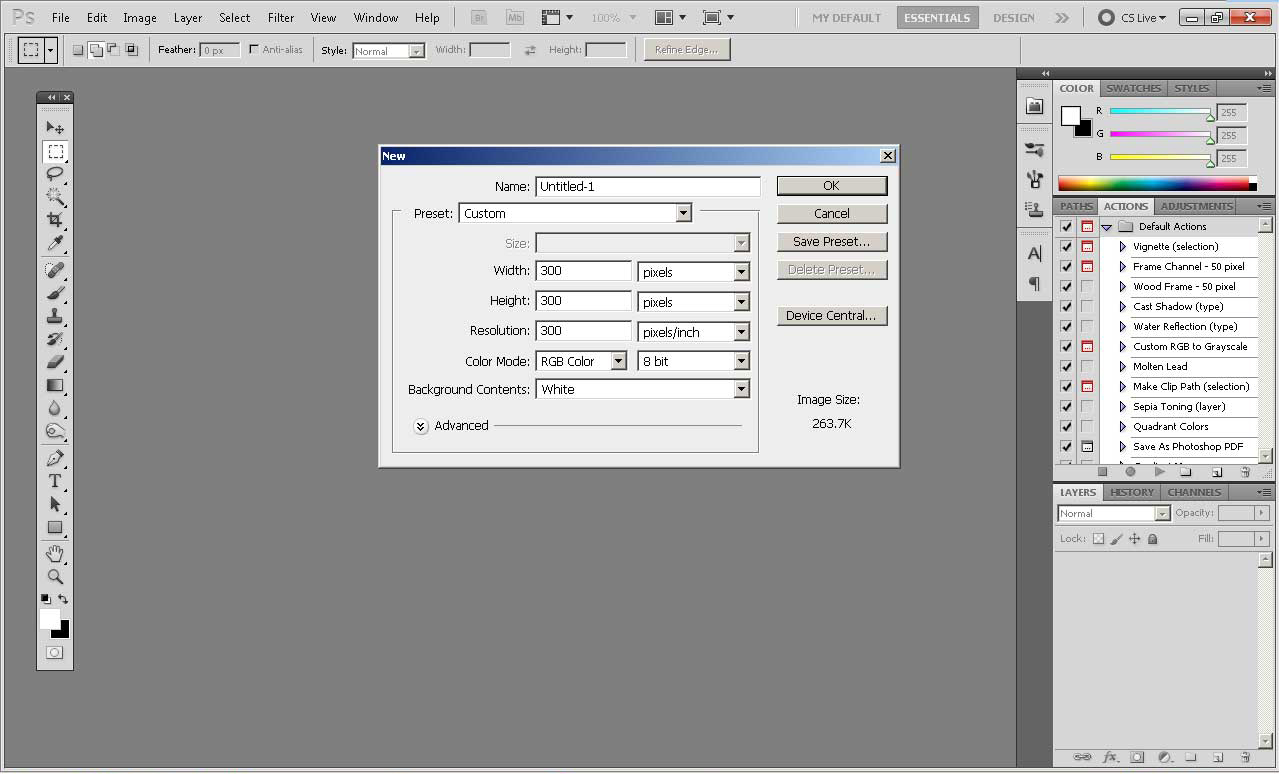
Start a new blank file - File|New from the menu - and fill it with white.  300x300 pixels should be adequate or you can make it larger to give yourself more working room and crop it to size later. The final image created for this demonstration is cropped to 300x104 pixels.

You can make your brush with the Type Tool or create it free-hand with the Brush Tool. I chose a combination of free-hand and text for my brush.

We'll get the easy part out of the way first.

Set the foreground color to Black. Create a New Layer, choose the Type Tool and hold down ALT while you type 0169 using the numeric keypad.  When you release the ALT key you get a copyright symbol "©".
[Apple gets off easy. It's just  Option+G].

Type in the year and then your copyright message. Because we put the copyright on its own layer it will be easy to go back and change the year to the next year when we need to.


If you're on a laptop, you'll need to use your special function to choose the numeric keypad overlay. Remember to turn it off afterward so you can continue to type.

Once you have your text created, you can size it to fit with the Move Tool. Check the box that says "Show Transform Controls". Hold down SHIFT and drag the corners to keep it proportional.

Now comes the fun part. Create another new layer, choose the Brush Tool and sign your name.


You can use a pen tablet or the mouse to write your name. If you don't have a pen tablet and can't write well with the mouse, get a cheap caligraphy pen from the art store and practice writing your name on copy paper. When you get good at it, write it large a single time on one sheet. Tape it to the wall where it will be evenly lit and photograph it with a digital camera.

If your hand writing is as execrable as mine this may take some time. I ended up having to do it on multiple layers and paste the best parts together.

Save your work as a Photoshop .PSD file so you can come back to it later when you need to change the year.

Turn off the eye next to the background layer. CTRL+Click the signature layer. CTRL+SHIFT+Click the copyright text layer. Both layers will now be selected. Alternatively, you can merge the two layers after saving the file. The key is the background layer is still there, but invisible.


From the Menu select Edit|Define Brush and give it a clever name like "Copyright Brush".

And there you have it, a ready made signature for your images.

It's a brush, so you can sign your images in any color "ink" just by setting the foreground color. An acceptable gold color comes from R=98, G=89, B=1.

It's re-sizable using the square bracket keys, and you can use the "Fx" palette to emboss, embellish and gussy it up if you want to.

Monday, November 15, 2010

Building the Book

I've mentioned before that I am a student in Portrait Studio Management at Randolph Community College. The curriculum is intended to give us as much experience as possible creating the products we'll need to be able to sell our clients if we're actually going to make some kind of living from the business of Photography.

Our current project is creating a presentation Wedding Book.

http://www.albexus.com/

Each student is required to create six pages as if we were putting together the entire album for a client.

I created a template for a 10"x10" album with true panoramic pages. It's essentially a 20" wide x 10" high page configured for 300 dpi.


I added guides at 1/2" in from each edge and guides for the horizontal center and for the center line between the two pages. I can add an image to fill the background or use solid colors.

The individual images are copied, pasted, re-sized to fit and then saved as a PhotoShop .PSD file.

The current book is a little cramped because I'm trying to jam the whole wedding, about 55 images, into six pages (12 sides). In the real world I'd have about twice as many images and 4 times as many pages to display them.


When the page is finished I convert it to sRGB, flatten it and save it as a Quality 12 JPEG and it's ready to FTP. I retain the .PSD files because, once again in the real world, I'd soft proof the book with the client before committing it to the printer.

Thursday, November 4, 2010

Maddy

One of our assignments in portraiture is photographing children on location.

This is Maddy.

Pentax K10D, Tokina ATX 28-70f/2.8, ISO 100, f/5.6 @ 1/60 sec
Lessons Learned:

Take your vitamins. Two year olds are ACTIVE!
Do not try to photograph an active two year old anywhere near a water feature.
Grandma makes a good baby wrangler. Two year olds always come when Grandma calls.
Judicious application of Gaussian Blur makes a "romantic" portrait and can conceal certain problems (see lesson 2 above about water hazards).

Have fun.